How a blind student reads a document
A guided walk through twelve short examples and the sector context, side by side. Each example shows the same content twice. Once as it sounds when the document has not been remediated. Once as it sounds after a trained remediator has worked on it. Built for a sighted audience with no prior exposure to screen readers.
How to use this page
- Each example has two play buttons. The blue solid button plays at real screen reader speed, about 240 words a minute. The outlined button plays the same words at a slower pace, about 210 words a minute.
- If you have never heard a screen reader before, press the slower button first to follow every word. Then press the realistic button to feel how fast it actually sounds.
- You can stop any clip with the "Stop audio" button at the top of the page. Pressing a different play button stops the previous one for you.
Get started
First, hear what a screen reader sounds like. Then look at the document we will be testing.
What a screen reader actually is
In one sentence. A screen reader is software, not hardware. It reads what is on the screen out loud. It is how a person who cannot see uses a computer.
A screen reader runs on the same laptop or phone you already use. When the screen changes, the screen reader speaks. When the user presses arrow keys, it reads the next line. When it meets a heading, it announces "heading". When it meets a button, it says "button". When it meets a picture, it reads the picture's text description. If the picture has no description, the screen reader has nothing to read, and the user does not know the picture is there.
Hear a screen reader introduce itself
The voice you will hear in every clip on this page is a Windows speech voice. The first button next to each clip plays at the speed a regular screen reader user actually listens at. About two hundred and forty words a minute. Experienced users go faster. New users go slower. The second button plays the same words at a relaxed pace, around two hundred and ten words a minute, so a sighted listener with no exposure to screen readers can catch every word.
Show transcript
Hello. I am a screen reader. I read what is on the screen, out loud, top to bottom. I am how a person who cannot see uses a computer. If a document is built well, you will hear headings, lists, tables, and images described clearly. If it is not, you will hear what comes next.
Common screen readers
- NVDA. Free. Open source. Made by NV Access in Australia. Used by most blind students in India because it costs nothing.
- JAWS. Paid. Made by Freedom Scientific. The professional standard in many corporate environments.
- VoiceOver. Built into every Mac, iPhone, and iPad.
- TalkBack. Built into every Android phone.
- Narrator. Built into Windows. The voice you are hearing in this demo is the same family of Windows voices that Narrator uses.
The page we are testing
In one sentence. A real research paper, published with no accessibility tags, gives us realistic content to test the screen reader on.
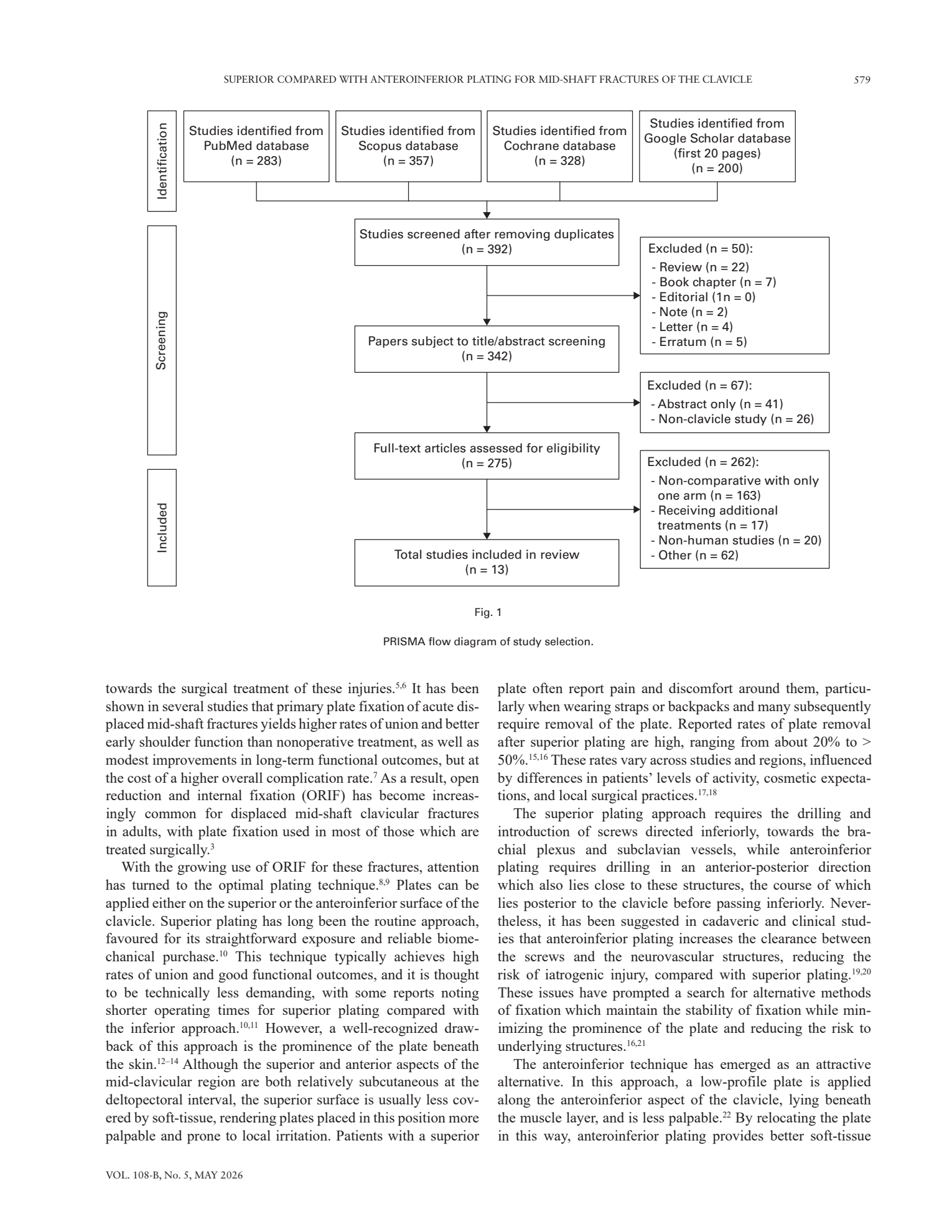
This is page two of a peer reviewed orthopaedic surgery research paper from The Bone and Joint Journal, May 2026. It contains a flow diagram, called a PRISMA diagram, that shows how the researchers selected studies for their meta analysis. Sighted readers can take in the diagram in seconds. A blind reader hears whatever the screen reader can extract.
Hear the differences, side by side
Eight short comparisons. Each shows the same content twice, once unremediated and once remediated, with a real screen reader voice reading both.
The same figure, two ways
In one sentence. Without alt text, a figure is invisible to a screen reader user. With it, the figure is as readable as the prose around it.
The PRISMA diagram is the load bearing piece of the page. A meta analysis lives or dies on which studies were included and excluded. The image stays on the left as you scroll. The two panels on the right read the same figure two ways. Try the slower button first if you have not heard a screen reader before, then play the realistic one to feel how fast it actually sounds.
What the screen reader says today
The PDF was published with no tags, no alt text, and no reading order. The screen reader does its best with the raw text it can extract. The boxes in the diagram are read in the order they sit in the PDF stream, which is not the order a sighted reader follows.
Show transcript
Page two. Volume one zero eight dash B, Number five, May twenty twenty six. Superior compared with anteroinferior plating for mid shaft fractures of the clavicle. Five seven nine. Graphic. Studies identified from PubMed database. open paren. n equals two eight three. close paren. Identification. Studies identified from Scopus database. open paren. n equals three five seven. close paren. Studies screened after removing duplicates. open paren. n equals three nine two. close paren. Studies identified from Cochrane database. open paren. n equals three two eight. close paren. Studies identified from Google Scholar database. open paren. first twenty pages. close paren. open paren. n equals two zero zero. close paren. Screening. Included. Papers subject to title slash abstract screening. open paren. n equals three four two. close paren. Full text articles assessed for eligibility. open paren. n equals two seven five. close paren. Total studies included in review. open paren. n equals one three. close paren. Fig one. PRISMA flow diagram of study selection. Excluded. open paren. n equals fifty. close paren. colon. Review. open paren. n equals twenty two. close paren. Book chapter. open paren. n equals seven. close paren. towards the surgical treatment of these injuries.
What just went wrong. The figure is announced only as "Graphic". The four PRISMA stages are read out of order, mixed with the box contents, and the exclusion lists from later stages spill into earlier ones. The blind student cannot reconstruct which studies fed which stage.
What the same figure could say
After remediation, the figure has alt text. The alt text describes the diagram in plain language, in the order a sighted reader follows. Headings are tagged so the screen reader user can jump to "Methods" by pressing H. The reading order continues into the prose without spilling.
Show transcript
Page two. heading level two. Methods. heading level three. Study selection. Figure one. PRISMA flow diagram. Image alt text. PRISMA flow diagram showing study selection in four stages. Stage one, Identification. Searches returned two hundred and eighty three records from PubMed, three hundred and fifty seven from Scopus, three hundred and twenty eight from Cochrane, and two hundred from the first twenty pages of Google Scholar. Stage two, Screening. After removing duplicates, three hundred and ninety two records were screened. Three hundred and forty two went on to title and abstract screening. Fifty were excluded at this step. Stage three, Eligibility. Two hundred and seventy five full text articles were assessed. Two hundred and sixty two were excluded, mostly because they were single arm or non comparative. Stage four, Included. Thirteen studies were included in the final review. End of image alt text. Paragraph. As a result, open reduction and internal fixation has become the preferred surgical approach for displaced mid shaft clavicle fractures.
What changed. The same figure is now navigable as a four stage flow. The numbers are spoken in their proper place. The student can follow the meta analysis the way a sighted reader follows the diagram.
The same table, two ways
In one sentence. A table without row and column tags is read as a flat list. A tagged table pairs each value with its column header, so meaning survives.
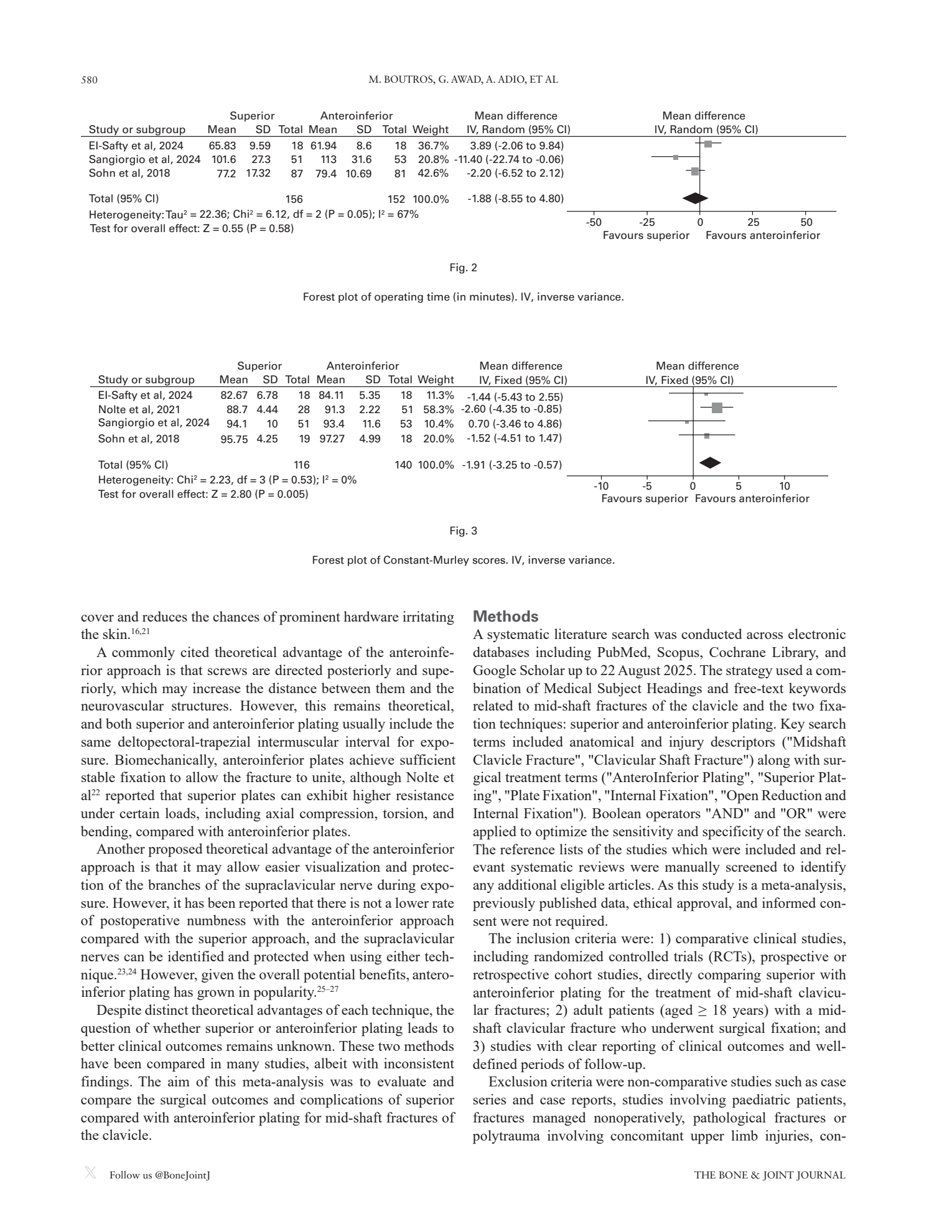
Page three of the same paper carries a forest plot table. Each row is one study contributing to the meta analysis. Each column is a measurement. A sighted reader reads it as a grid. A blind reader hears whatever the screen reader can do with the underlying text.
The table without row and column structure
If the table is not tagged as a table, the screen reader reads the cell values in a flat run on. Column headers are mentioned once at the top and never again. By the time the third row plays, the listener has lost track of which number belongs to which column.
Show transcript
Superior. Anteroinferior. Mean difference. Mean difference. Study or subgroup. Mean. SD. Total. Mean. SD. Total. Weight. IV comma Fixed open paren ninety five percent CI close paren. IV comma Fixed open paren ninety five percent CI close paren. El Safty et al twenty twenty four. eighty two point six seven. six point seven eight. eighteen. eighty four point one one. five point three five. eighteen. eleven point three percent. minus one point four four open paren minus five point four three to two point five five close paren. Nolte et al twenty twenty one. eighty eight point seven. four point four four. twenty eight. ninety one point three. two point two two. fifty one. fifty eight point three percent. minus two point six zero open paren minus four point three five to minus zero point eight five close paren.
The table with row and column headers tagged
When the table is tagged with proper header cells, the screen reader pairs each value with its column. The user can press a key to jump from cell to cell, and each value is announced together with what it is.
Show transcript
Table one. Constant Murley score, superior versus anteroinferior plating. Three rows, ten columns. Column headers. Study, then mean for superior, standard deviation for superior, total participants for superior, mean for anteroinferior, standard deviation for anteroinferior, total participants for anteroinferior, weight, mean difference, ninety five percent confidence interval. Row one. Study, El Safty and colleagues twenty twenty four. Mean for superior, eighty two point six seven. Standard deviation, six point seven eight. Total, eighteen. Mean for anteroinferior, eighty four point one one. Standard deviation, five point three five. Total, eighteen. Weight, eleven point three percent. Mean difference, minus one point four four. Ninety five percent confidence interval, minus five point four three to two point five five. Row two. Study, Nolte and colleagues twenty twenty one. Mean for superior, eighty eight point seven. Standard deviation, four point four four. Total, twenty eight. Mean for anteroinferior, ninety one point three. Standard deviation, two point two two. Total, fifty one. Weight, fifty eight point three percent. Mean difference, minus two point six zero. Ninety five percent confidence interval, minus four point three five to minus zero point eight five.
A paragraph, with and without headings
In one sentence. Headings are not just bigger bolder text. They are landmarks that let a blind student skim a document the way a sighted student does.
To a screen reader, a tagged heading is a landmark that the user can jump to with a single keystroke. Press H, and the reader moves to the next heading. Press 2, and it moves to the next H2. Without tags, all of that is gone. The whole document is one undifferentiated block, and the user must listen to it front to back. Below, the same passage on Newton's laws of motion appears two ways. The text is identical. The structure is not.
One block of text, no headings
This is what the page below looks like to a screen reader. There are no heading tags, so the user cannot skim, cannot jump, and cannot tell where one law ends and another begins.
Newton's laws of motion. Isaac Newton published three laws of motion in 1687. An object at rest stays at rest. An object in motion stays in motion at the same speed and in the same direction, unless acted upon by a force. The acceleration of an object depends on the force applied and the mass of the object. The greater the force, the greater the acceleration. The greater the mass, the smaller the acceleration for the same force. For every action there is an equal and opposite reaction. When you push on a wall, the wall pushes back on you with equal force.
Show transcript
Newton's laws of motion. Isaac Newton published three laws of motion in 1687. An object at rest stays at rest. An object in motion stays in motion at the same speed and in the same direction, unless acted upon by a force. The acceleration of an object depends on the force applied and the mass of the object. The greater the force, the greater the acceleration. The greater the mass, the smaller the acceleration for the same force. For every action there is an equal and opposite reaction. When you push on a wall, the wall pushes back on you with equal force.
What just went wrong. Same words. No structure. No way to skim. No way to jump from the first law to the third without listening to the second one all the way through. For a textbook chapter this is the difference between a five minute review and a one hour relisten.
The same passage, with proper headings
The same content, with H2 and H3 tags applied. The screen reader announces each heading. The user presses H to jump law to law, or 3 to jump from one H3 to the next.
Newton's laws of motion
Isaac Newton published three laws of motion in 1687.
First law, the law of inertia
An object at rest stays at rest. An object in motion stays in motion at the same speed and in the same direction, unless acted upon by a force.
Second law, force and acceleration
The acceleration of an object depends on the force applied and the mass of the object. The greater the force, the greater the acceleration. The greater the mass, the smaller the acceleration for the same force.
Third law, action and reaction
For every action there is an equal and opposite reaction. When you push on a wall, the wall pushes back on you with equal force.
Show transcript
heading level two. Newton's laws of motion. Isaac Newton published three laws of motion in 1687. heading level three. First law, the law of inertia. An object at rest stays at rest. An object in motion stays in motion at the same speed and in the same direction, unless acted upon by a force. heading level three. Second law, force and acceleration. The acceleration of an object depends on the force applied and the mass of the object. The greater the force, the greater the acceleration. The greater the mass, the smaller the acceleration for the same force. heading level three. Third law, action and reaction. For every action there is an equal and opposite reaction. When you push on a wall, the wall pushes back on you with equal force.
What changed. Same words. The screen reader user can now press H to jump from "First law" to "Second law" to "Third law" without listening to the bodies. A textbook with hundreds of headings becomes navigable.
A simple equation, with and without alt text
In one sentence. An equation rendered as an image with no alt text is silent to a screen reader. With short alt text, a simple equation reads like a sentence.
Most school and university textbooks render equations as images, even in modern PDFs. If the image has no alt text, a blind student hears only "graphic" and never learns the equation. The same image with a short alt text becomes part of the prose. Below is a mock of how this page would actually look in a textbook. The screen reader reads everything in this excerpt, including the heading and the prose around the equation.
Equation rendered as an image, no alt text
The textbook page has a heading, a sentence introducing the theorem, the equation as an image, and a closing sentence. The screen reader reads the heading and the sentences fine. When it meets the equation image, with no alt text attached, it announces only "graphic".
Show transcript
heading level two. The Pythagorean theorem. The Pythagorean theorem describes the relationship between the three sides of a right triangle. graphic. Knowing this relationship lets you find the length of any side of a right triangle if you know the other two.
What just went wrong. The student knows the theorem is about right triangles. The student does not know what the theorem actually says. The graphic was the whole point of the page.
Same equation, with short alt text written in spoken form
A trained remediator has written a short alt text that reads the equation the way a teacher would say it aloud. The screen reader announces it as an equation and reads the alt text in place.
Show transcript
heading level two. The Pythagorean theorem. The Pythagorean theorem describes the relationship between the three sides of a right triangle. equation. a squared plus b squared equals c squared. End equation. Knowing this relationship lets you find the length of any side of a right triangle if you know the other two.
What changed. Same image. A short alt text was added in spoken form. For an equation this simple, that is enough. The student now has the theorem in their ear and can write it down or memorise it.
A complex equation, alt text versus long description
In one sentence. Short alt text is a label that says what the equation is. A long description walks through what the equation says. Complex equations need both.
Short alt text answers, "what is this thing?" Long description answers, "how is this thing built?" For a simple equation like a squared plus b squared equals c squared, short alt text is enough. For a complex equation with fractions, square roots, and grouping, the student needs the structure read out the way a sighted reader's eye walks through it. Below is the quadratic formula, shown the way it appears in a textbook page, then read two ways.
"The quadratic formula"
The remediator has written a short alt text that names the equation but does not describe its parts. The screen reader announces it as an image, says "the quadratic formula", and moves on. For a passing reference this can be fine. For a textbook page that expects the student to use the formula, it is not.
Show transcript
heading level two. Solving a quadratic equation. To solve a quadratic equation of the form, a x squared plus b x plus c equals zero, use the quadratic formula. image, the quadratic formula. Once you know the values of a, b, and c, substitute them and evaluate.
What just went wrong. The image was given a short label, "the quadratic formula". The label tells the student what the image is, but not what it says. The student cannot use the formula because they have not heard its parts.
The same equation, walked through piece by piece
A trained remediator has written a long description that walks through the equation the way a sighted reader's eye does. The screen reader announces it as an equation, reads the structure, and the student can write it down or work with it.
Show transcript
heading level two. Solving a quadratic equation. To solve a quadratic equation of the form, a x squared plus b x plus c equals zero, use the quadratic formula. equation. The quadratic formula. Long description. x equals, fraction. Numerator. negative b, plus or minus, the square root of, open paren, b squared minus 4 a c, close paren. Denominator. 2 a. End fraction. End equation. Once you know the values of a, b, and c, substitute them and evaluate.
What changed. The same image. A long description was added that walks through the structure of the formula piece by piece, in the order a sighted reader follows it. The student now has the formula in spoken form and can write it down. For real STEM remediation, MathML is also embedded so braille displays can render the equation in mathematical notation, but the spoken long description is what carries the load for an audio learner.
An even more complex equation, where structure carries the meaning
In one sentence. When an equation has a square root over a fraction over a summation with bounds, short alt text becomes useless. The long description has to walk through every structural level.
The quadratic formula has two structural levels: a fraction, with a square root inside it. The population standard deviation formula has six. A square root, over a fraction, whose numerator is a summation, whose summation has lower and upper bounds, and whose summand is a squared difference of a subscripted variable from a Greek letter. Below is the standard deviation formula in textbook context, then read two ways.
"The standard deviation formula"
The remediator has labelled the image, but not described its structure. The screen reader announces the heading, the prose, and then says "the standard deviation formula" before moving on. The student is told the formula exists. The student is not told what it contains.
Show transcript
heading level two. The population standard deviation. The standard deviation measures how spread out the values in a data set are around their mean. A small standard deviation means the values cluster close to the mean. A large standard deviation means the values are spread far from it. image, the standard deviation formula. Equation three. The population standard deviation. Where capital N is the number of values in the data set, x sub i is the i th value, and mu is the mean. Substitute the values into the formula and compute.
What just went wrong. The label tells the student what kind of formula this is, but not what is in it. The student does not know there is a square root, a fraction, a summation, a squared difference, or a Greek letter mu. The label is useless for any student who actually needs to evaluate the formula.
The same equation, walked through structure first
A trained remediator has written a long description that descends through the structure layer by layer, in the order a sighted reader's eye does. Square root over a fraction. Numerator is a summation with bounds. Summand is a squared difference. The student now has the entire structure of the formula in spoken form.
Show transcript
heading level two. The population standard deviation. The standard deviation measures how spread out the values in a data set are around their mean. A small standard deviation means the values cluster close to the mean. A large standard deviation means the values are spread far from it. equation. The population standard deviation formula. Long description. sigma equals, the square root of, open paren, fraction. Numerator. The summation, lower limit, i equals 1. Upper limit, capital N. Of, open paren, x sub i, minus, mu, close paren, squared. Denominator. capital N. End fraction, close paren. End equation. Equation three. The population standard deviation. Where capital N is the number of values in the data set, x sub i is the i th value, and mu is the mean. Substitute the values into the formula and compute.
What changed. The same image. The long description walks through six structural levels in order. The student can write down the formula from the audio alone. For real STEM remediation, MathML is also embedded so braille displays can render the formula in mathematical notation.
The same links, described and undescribed
In one sentence. Screen reader users often pull up a list of every link on the page. "Click here" tells them nothing.
A screen reader user often pulls up a list of every link on the page with a single keystroke, then reads the list out of context to decide which one to follow. So link text has to make sense by itself. The same three links below appear two ways. On the left, every link reads as "click here". On the right, every link describes where it leads.
Every link reads "click here"
This is the most common single accessibility failure on the public web. The author writes "click here" because it is short. The screen reader user has no idea where any of these links go without reading the surrounding sentence first.
For more information about WCAG 2.1, click here. To apply for the 2026 training cohort, click here. To read our privacy policy, click here.
Show transcript
list of three links on this page. link, click here. link, click here. link, click here. end of list. There is no way to tell which link goes where without reading the surrounding text first.
Each link describes where it leads
The same three links, with descriptive text. The screen reader user can scan the link list and decide which to follow without reading anything else.
Read the WCAG 2.1 standard at W3.org. Apply to the 2026 EquitableDocs training cohort. Read the EquitableDocs privacy policy.
Show transcript
list of three links on this page. link, read the WCAG 2 point 1 standard at w 3 dot org. link, apply to the twenty twenty six EquitableDocs training cohort. link, read the EquitableDocs privacy policy. end of list. Each link is self explanatory. The user can decide which one to follow without reading the surrounding text.
The same diagram, with and without alt text
In one sentence. The diagram is identical for both reads. What changes is whether the screen reader has anything to say about it.
Below is a simple Venn diagram with a heading above it and a paragraph alongside. The visual is identical for both demos. What differs is what the screen reader can say about the diagram. On the left, the diagram has no description, so the screen reader announces only "graphic" and moves on. On the right, the diagram has been given a plain language description, so the screen reader can read it the way a sighted person sees it.
The diagram has no alt text
The heading and the paragraph read fine. When the screen reader reaches the diagram, it announces only "graphic" because there is no description attached. The blind student knows a graphic is there, but cannot learn what it shows.
Show transcript
heading level two. Two ways accessibility happens. There are two main ways a document becomes accessible. One is to build it accessible from the start, in the source file, before it is exported as a PDF. The other is to remediate it after the fact, by editing the PDF directly. Most real work uses both. graphic. End of section.
The same diagram, with alt text written in plain language
A trained remediator has written a short description of the diagram. The screen reader announces it as an image and reads the description in the order a sighted person would scan it.
Show transcript
heading level two. Two ways accessibility happens. There are two main ways a document becomes accessible. One is to build it accessible from the start, in the source file, before it is exported as a PDF. The other is to remediate it after the fact, by editing the PDF directly. Most real work uses both. image. Venn diagram showing two overlapping circles. Left circle is labelled, accessible from the source. Right circle is labelled, remediated after the fact. The overlapping middle area is labelled, what EquitableDocs trains for, both at once. End of image. End of section.
Understand and apply
Now that you have heard the differences, see what remediation actually changes inside the document, what the work is as a craft, who does this work in India, where it does not yet reach, and how a community of practice can close the gap.
What "remediation" actually changes
In one sentence. Remediation does not change the visible document. It adds a hidden tag tree that screen readers read from.
Remediation is the work of going inside a PDF and adding the structural information that was never put there at the source. It is mostly invisible from the outside. The pixels on the page do not change. What changes is the underlying tag tree that screen readers read from.
- Headings get tagged. The phrase "Methods" stops being just a bold word and becomes "heading level two", which means the screen reader user can press H to jump to it.
- Reading order is fixed. The PDF stream order is replaced with the order a sighted reader actually follows, including across columns and around figures.
- Images get alt text. A trained remediator writes a plain language description of what the figure shows, so the screen reader has something to say.
- Tables get header cells. Each cell knows which row and column it sits in, so the value is announced with its meaning.
- Decorative elements are marked as artifacts. Page numbers, running headers, and watermark logos are flagged so the screen reader skips them, instead of reading them on every page.
- Equations get short alt text and, when needed, a long description and MathML. A simple equation needs only short alt text. A complex equation needs a long description that walks through its structure. MathML is embedded so braille displays can render the equation in mathematical notation.
- Links are rewritten in self contained terms. "Click here" becomes "read the WCAG 2.1 standard at W3.org", so the link list is meaningful on its own.
For a research paper of this type and length, remediation is roughly two to four hours of human work, on top of automated tagging. The automated tagging gets the easy structure. The human catches the figure descriptions, the multi level table headers, the equation descriptions, and the reading order across the columns.
What this work actually is
In one sentence. Document accessibility remediation is a small craft. Each piece of structure a remediator adds answers a different question for a screen reader.
When a screen reader meets a document, it asks questions of the structure. What is this image about? Where am I in the table of contents? Which row of the table is this? What does this equation say? If the document was built with these questions in mind, the answers are there. If not, the remediator goes back and writes them in.
The work is closer to translation than to formatting. The remediator reads the document the way the author wrote it, then produces a parallel version that a screen reader can read. Below are four of the small skills that go into one document.
Adding alt text to an image
Alt text is a short text alternative for an image. The remediator looks at the image, decides whether it is informative or decorative, and writes a sentence that gives a blind reader the same information a sighted reader gets. For a complex diagram, alt text plus a longer description. For a decorative border, no alt text and a flag to skip it. The skill is in deciding what to describe, not in typing.
Adding heading structure
Sighted readers skim a document by the visual hierarchy. A screen reader user gets the same skim by jumping heading to heading with a single keystroke. The remediator marks each heading with its level. A chapter title is heading level 2. A sub-section is heading level 3. The skill is in matching the visual hierarchy to the right semantic levels, including for content that does not look like a heading at first glance.
Adding tags
A tag is a label inside the PDF that tells the screen reader what each piece of content is. This is a paragraph. This is a list. This is a table. This cell is a header. This image is a figure. Without tags, the screen reader sees only a stream of letters with no structure. With tags, it sees a document. The skill is in tagging accurately, especially for content that is visually complex like multi-column research papers and tables with merged cells.
Setting reading order
The order in which the screen reader reads the page is not always the order on the page. A two-column article might be read down the left column, then down the right. A figure might be read with its caption immediately, or at the end of the section. The remediator decides the order and writes it into the document. The skill is in matching the order a sighted reader actually follows.
Each of these is a small craft. Each can be taught. None of them is mechanical. A trained remediator brings judgment to every page.
Who does this work in India today
In one sentence. A small mission-led group produces accessible content for Indian readers. A larger commercial group serves clients abroad. The two streams barely overlap.
Document accessibility work in India is split into two distinct ecosystems. They share the technical skills but not the people, the priorities, or the funders. Both deserve recognition. Neither alone is enough.
Mission-led organisations
The few players actively producing accessible Indian content for Indian readers, in Indian languages and for Indian curricula. Most of these organisations also train, advocate, and serve students directly.
- Saksham Trust, Delhi. DAISY production, accessible textbooks, co-runs Sugamya Pustakalaya with the DAISY Forum and TCS.
- I-Stem, Bengaluru. Bookshare India operations, AI-aided remediation, advocacy with Mission Accessibility and Vidhi.
- Raised Lines Foundation, Delhi. STEM accessibility, including mathematics and tactile graphics.
- AssisTech Foundation, IIT Delhi. Research, assistive technology innovation, training.
- Bookshare India. Accessible book library for Indian readers.
- Sugamya Pustakalaya. National accessible book platform.
- Vision Empower, Bengaluru. STEM education for blind students, teacher training.
- Karna Vidya Foundation, Chennai. Tactile and accessible education materials.
- Vidyasagar, Chennai. Disability services, accessible educational content.
- XRCVC, St. Xavier's College, Mumbai. National accessibility centre, banking access, education.
- NIEPVD, Dehradun. Government accessible content production under DEPwD.
- Mitra Jyothi, Bengaluru. Kannada accessible content, DAISY production.
- Help the Blind Foundation. Materials and training.
This is not a complete list. These are the players actively producing accessible content for Indian readers today.
Commercial vendors
Larger, faster, mostly serving clients in the United States, the United Kingdom, and the European Union.
- Hurix Digital, Mumbai and Chennai.
- Continual Engine, Bengaluru.
- BarrierBreak, Mumbai.
- Magic EdTech, Noida.
- Lumina Datamatics, multiple cities.
- Aptara, Noida and Dehradun.
- Innodata, Deque India, MPS Limited.
Most of their volume is foreign textbooks, foreign government documents, and foreign corporate filings. Indian content is a smaller share. BarrierBreak and Continual Engine are notable for employing persons with disabilities in core roles, not only in advisory roles.
The two streams have grown separately. The mission-led stream serves Indian readers but operates with limited resources. The commercial stream has staff and infrastructure but mostly serves clients abroad. A blind student in India mostly receives content from the mission-led stream. A remediator in India mostly works in the commercial stream.
Where the work does not yet reach
In one sentence. The people who produce most documents in India do not know how to make them accessible. The work happens later, elsewhere, at cost. Or not at all.
The technical work happens late in a document's life, by remediators. The much larger group that produces documents in the first place is missing from the picture.
Universities
Most Indian universities do not have in-house remediation teams. Disability services staff handle a few documents on request when a blind student arrives. The rest of the catalogue is inaccessible by default. Faculty are not trained to produce accessible course material.
Libraries
University and public libraries are the natural host for accessible content. Most do not have the skill or the budget. A few exceptions like XRCVC at St. Xavier's Mumbai prove the model works at scale.
Publishers
NCERT, state textbook boards, and commercial publishers in India produce thousands of titles a year. A small fraction is born accessible. The rest needs remediation later, by someone else, at cost.
Faculty and authors
A teacher who makes a slide deck, a researcher who writes a paper, a curriculum writer who lays out a textbook. Each makes hundreds of small choices that determine whether the document will be accessible. These are the choices that matter most. They are also the choices nobody is taught to make.
Remediation can fix a document after the fact, but the cheapest and most reliable accessibility comes from the source.
The Accessibility Collective, a community of practice for everyone in the picture
In one sentence. A community of practice can teach these skills to remediators, library staff, and publishers. Together they close the gap.
The Accessibility Collective is the response to everything you have heard on this page. It is a community of practice that EquitableDocs is gathering now. It brings three audiences into the same conversation, on the same craft, with shared training and shared knowledge.
Existing remediators
Vendor staff in Hurix, Continual Engine, BarrierBreak, and the smaller studios. Solo freelancers. Production staff in Saksham Trust, I-Stem, Vision Empower, and other DPOs.
What they would gain: peer review of complex work, advanced topics like STEM and Indic script reading order, contact with the screen reader users they rarely meet, Indian voices in international standards.
Library and disability services staff
People who run disability resource centres, accessibility cells, and library services at Indian universities and schools.
What they would gain: the ability to remediate simple documents themselves, fast, instead of always sending out. Shared materials and training they can pass on to colleagues.
Publishers, authors, and faculty
People who produce documents in the first place. NCERT writers, university faculty, school textbook authors, communications teams.
What they would gain: the small set of source-document choices that prevent most accessibility failures from ever happening. Heading styles. Alt text habits. Table structure. The skills that make remediation faster, or unnecessary.
The Collective is free to join. The work is mission-led. There is no fee, no commercial commitment, and no expectation that you have done this work before.
Join the interest group. The form takes about a minute. WhatsApp is optional. Email list works too.