Reader perspective · Per-defect walkthrough

What this PDF is like for a screen reader user

This file walks through the audited PDF one defect at a time. It is written to be read with a screen reader. The Hear it aloud buttons let sighted readers hear a browser-voice version of what blind readers experience.

Audited file
BJJ-2025-0712.R1_NO_ALT.pdf
Audience
Screen reader users, accessibility reviewers, remediation teams
Findings in this file
4 defects · 1 blocker · 3 high
Evidence
NVDA transcript, tag tree, page screenshot, Acrobat fix steps

Standards verdict, this file

PDF/UA-1 Not met

The file is not PDF/UA-1 compliant. The four defects in this walkthrough block reliable screen reader access to the page content.

4 defects affect screen reader output · author grouping, empty tags, reading order, missing image text

WCAG 2.2 AA Not met

The file fails Success Criteria for Info and Relationships (1.3.1), Meaningful Sequence (1.3.2), and Non-text Content (1.1.1).

3 of 4 defects map to AA · 1 also maps to PDF/UA-1 only

01 Orientation

How to read this walkthrough

Each finding card holds the same four pieces of evidence: what the reader hears, where it appears on the page, what the hidden tag says, and what exact repair changes the reading.

What each card shows

Every card starts with the user impact, then shows page evidence, screen reader output, the tag tree, and the fix steps. A tag tree is the hidden reading structure inside a PDF.

How to read transcripts

The transcript is a short NVDA-style sample. The Hear it aloud button uses the browser voice, so it is not the real NVDA voice. It does carry the pauses, repeats, and wrong order that create the problem.

Why screenshots are included

The screenshot links the hidden reading problem to the visible page. The magenta rectangle shows exactly which part of the page the screen reader stumbled over.

02 Findings · 4 defects

Per-defect walkthrough

Press Hear it aloud first, then read the transcript, the tag evidence, and the page screenshot. The fix steps come last.

D-001

Author names are tagged as separate paragraphs.

High Page 1 · tagging
What this sounds like

Each author name reads as a separate paragraph, with a half-second pause between names.

A blind student hears nine isolated names with audible silences between them. The names stop sounding like one author line and start sounding like unrelated facts.
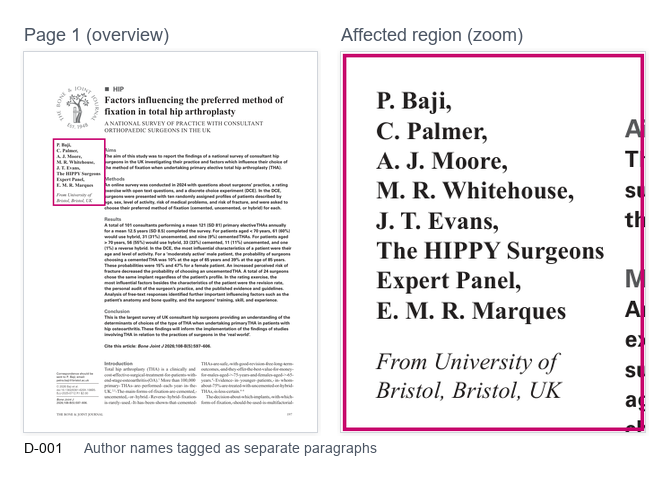
Page 1 evidence · author block, structure position 17 Magenta highlight = affected element
Screenshot of page 1 showing the author names with a magenta rectangle around the affected author block.
The visible page shows one compact author block. The hidden tags split that block into many separate paragraph tags. The screen reader follows the tags, not the spacing.
Screen reader output

NVDA transcript

M Boutros [paragraph] G Awad [paragraph] A Adio [paragraph] [seven more, each as a paragraph]
Tag tree evidence

PDF tag structure

<Document>
  <Sect>
    <H1> Introduction
    <P> Chapter 4 prelude
    <P> M Boutros
    <P> G Awad
    <P> A Adio
    <P> R Sharma
    <P> ... 5 more
    <P> Affiliations
    <P> Abstract opens
Repair

Fix in Acrobat Pro

  1. Open the Tags panel. Locate the author names on page 1.
  2. Select the author-name paragraph tags as one group.
  3. Create one list or one clean paragraph for the full author block.
  4. Check that each child tag has clear text and no empty tag between names.
  5. Save. Re-run NVDA on page 1 to check the names read as one group.

Why it matters

Names are part of the same author block. The wrong tag shape adds false stops and makes the opening page harder to follow.

What to check next

Check affiliations and the abstract start. If those are also split into stray paragraphs, fix the nearby group at the same time.

Plain-language test

Ask whether the author line sounds like one grouped item. If it sounds like separate facts, the tags still need repair.
D-002

Empty marks make the screen reader say blank.

High Page 4 · reading output
What this sounds like

The screen reader says "blank" again and again.

The student cannot tell whether each "blank" is a fill-in answer, a layout gap, or missing text. The repeated word interrupts the task and forces the student to re-read nearby lines.

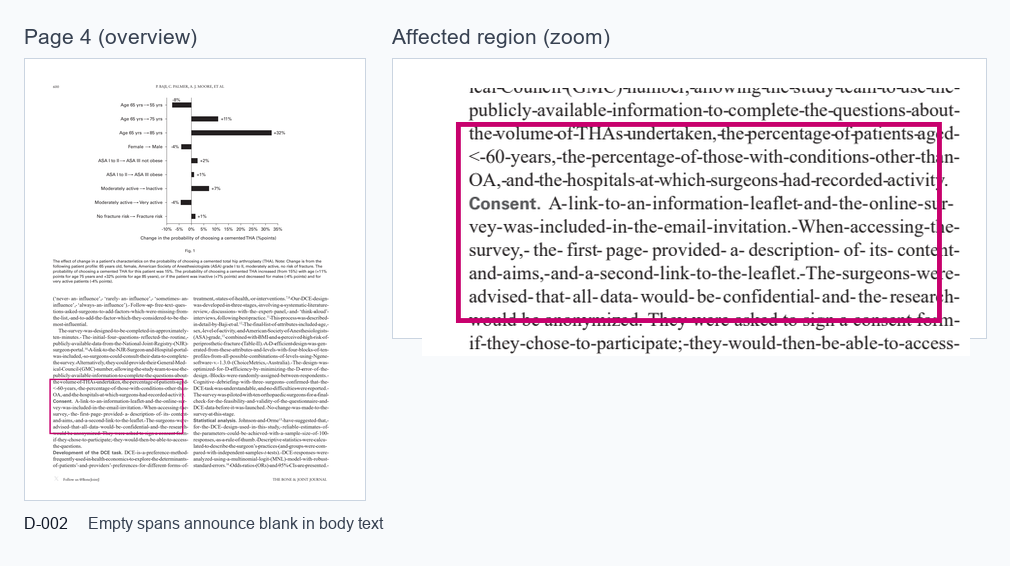
Page 4 evidence · repeated empty text tags Magenta highlight = affected element
Screenshot of page 4 with a magenta rectangle around the body text region tied to repeated blank announcements.
The marked region is tied to empty or near-empty tags in the hidden reading structure. When the reader reaches them, it may announce "blank" instead of moving smoothly to the next useful sentence.
Screen reader output

NVDA transcript

What is your guess? blank Subtract to test your answer. blank minus blank equal to blank Nate has blank shells left.
Tag tree evidence

PDF tag structure

<Document>
  <Sect>
    <P> What is your guess?
    <Span> ""
    <Span> ""
    <Span> ""
    <P> Subtract to test your answer.
    <Span> "" minus "" equals ""
    <P> Nate has ... shells left.
Repair

Fix in Acrobat Pro

  1. Open the Tags panel and find the empty text tags near the worksheet prompt.
  2. If the marks are only visual lines, mark them as Artifact, which means decoration that should be skipped.
  3. If the marks are real answer blanks, add clear visible text or a form field label.
  4. Remove empty spans that do not help the reader.
  5. Save and test the page. The repeated "blank" output should be gone.

Why it matters

Repeated "blank" output makes the task sound broken. It can also make a student think there are missing words.

What to check next

Search the tags for other empty spans. If many appear, the same source conversion may have created them across the PDF.

Plain-language test

Read the question aloud without the page in view. If the question no longer makes sense, the tags need a clearer label or cleanup.

D-003

The tag order does not match the visible reading order.

Blocker Page 9 · reading order
What this sounds like

The answer is announced before the question.

A blind student hears "The answer is twenty-five" first and "What is five squared?" second. The visible page may look correct, but the hidden order sends the lesson backwards.

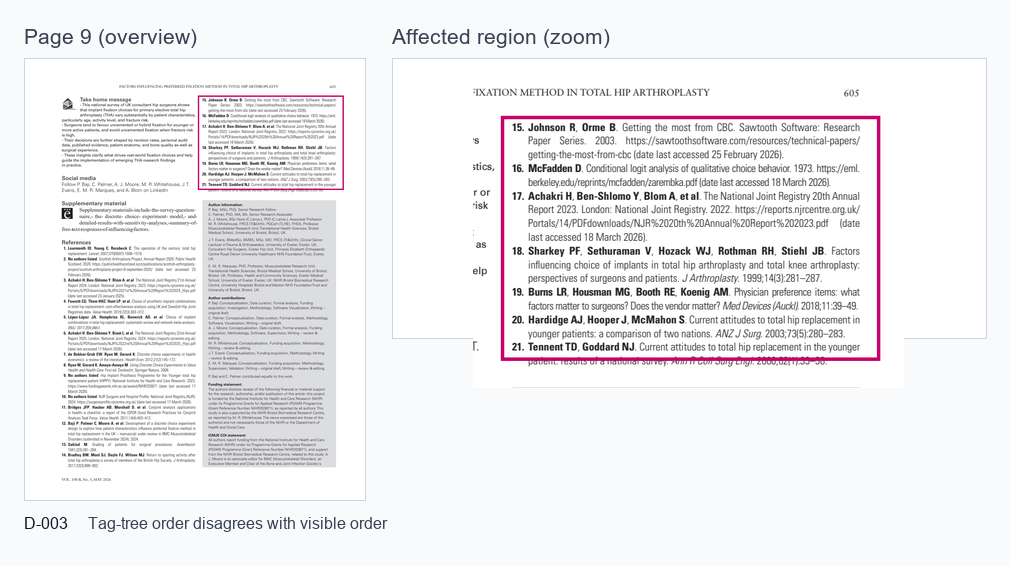
Page 9 evidence · worked example, hidden vs visible order Magenta highlight = affected element
Screenshot of page 9 with a magenta rectangle around the numbered reference block used to show reading order risk.
The tag tree must follow the same path a sighted reader uses. If it jumps ahead, the screen reader user hears information before it has context.
Screen reader output

NVDA transcript

The answer is twenty-five. [paragraph] What is five squared? [paragraph]
Tag order vs visible order

PDF tag structure

<Document>
  <Sect>
    <H3> Worked example
    <P> The answer is twenty-five.
    <P> What is five squared?
    <P> Solution method

Visible page order:
  1. What is five squared?
  2. The answer is twenty-five.
Repair

Fix in Acrobat Pro

  1. Open the Order panel and Tags panel side by side.
  2. Find the visible question and answer on page 9.
  3. Move the question tag above the answer tag.
  4. Check that headings, question text, answer text, and notes follow the visible order.
  5. Save and read with NVDA. The question should be heard before the answer.

Why it matters

Order changes meaning. In learning content, hearing the answer first can spoil the task and confuse the lesson path.

What to check next

Check nearby two-column or boxed content. These areas often have hidden order that differs from the visible page.

Plain-language test

Put the visible page away and listen only. If the order sounds strange, the hidden order likely still needs repair.

D-004

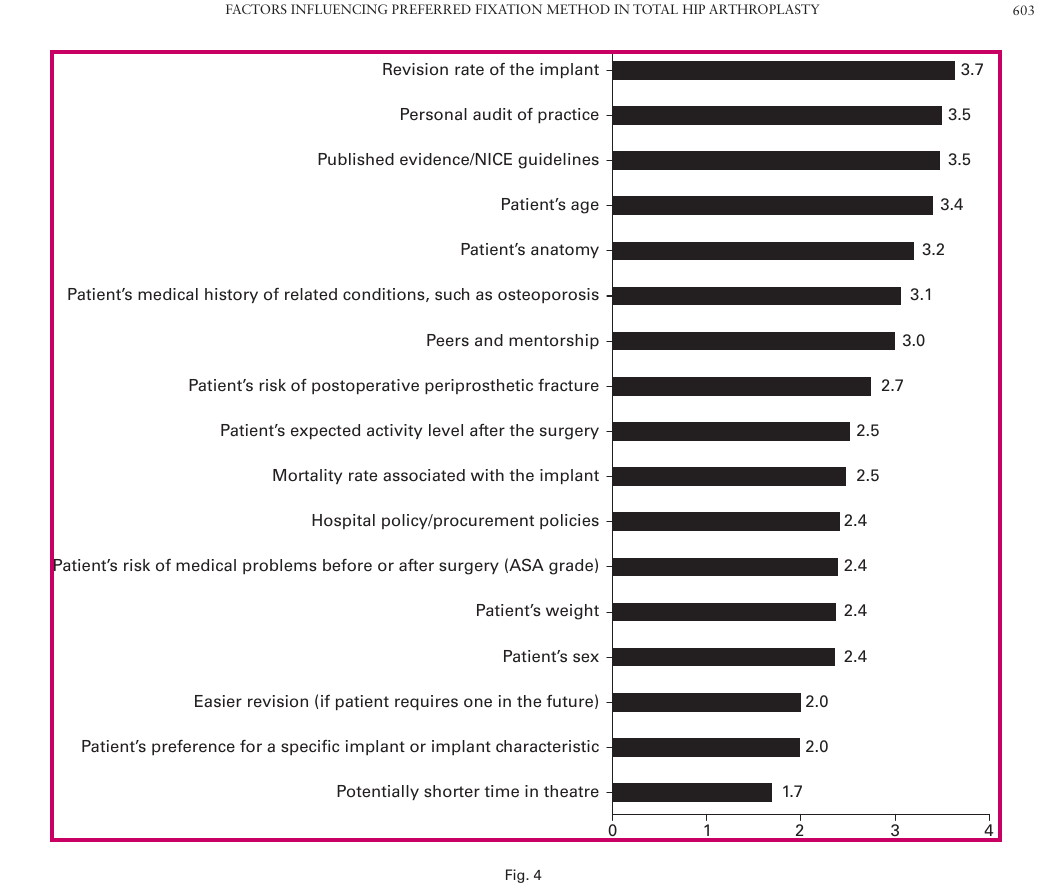
A figure has no useful description.

High Page 2 · alt text
What this sounds like

The screen reader only says "graphic" where the figure appears.

A sighted reader can inspect the figure and caption. A blind reader hears only that an image exists, with no clue about what the image shows or why it is included.

Page 2 evidence · figure tag with missing /Alt Magenta highlight = affected element
Screenshot of a figure area with a magenta rectangle around the image that needs a useful text description.
The highlighted figure carries meaning for the reader. The hidden structure needs a short text description that gives the same core meaning. The caption helps but does not replace it.
Screen reader output

NVDA transcript

heading level 2: Abstract graphic Figure 1. Distribution of sample responses. The next paragraph starts.
Tag tree evidence

PDF tag structure

<Document>
  <Sect>
    <H2> Abstract
    <Figure>
      /Alt: missing
    <Caption> Figure 1. Distribution...
    <P> The next paragraph starts.
Repair

Fix in Acrobat Pro

  1. Open the Tags panel and select the Figure tag.
  2. Open Object Properties, then the Tag tab.
  3. Add a short Alternate Text value. Alternate Text is the text a screen reader reads for an image.
  4. Describe the point of the figure, not every visual detail.
  5. Save and read. The figure should announce a useful description, not only "graphic".

Why it matters

Images can carry facts, trends, or instructions. Without a description, that information is missing for the screen reader user.

What to check next

Check each Figure tag. Decorative images should be marked as Artifact. Meaningful figures need Alternate Text.

Plain-language test

Cover the image and read only the nearby text. If the main point is missing, the image needs a description.

03 Full listening path

Sample transcript across all four findings

A short demo path that joins the four issues into one listening sample. Press the button to hear the pauses, repeats, and wrong order in sequence.

heading level 1: Introduction to Statistics M Boutros [paragraph] G Awad [paragraph] A Adio [paragraph] heading level 2: Abstract graphic Figure 1. Distribution of sample responses. Question 1: Nate finds 50 shells. How many shells does Nate have left? blank Subtract to test your answer. blank minus blank equal to blank heading level 3: Worked example The answer is twenty-five. [paragraph] What is five squared?

Pause after each highlighted line and ask whether the output gave enough context. In this sample, the answer is no at each highlighted point.

04 Standards map

How the four defects affect screen reader access

Each finding maps to a reader experience. The aim is not to list every rule, but to show why each repair changes the reading.

Finding What it changes for the reader Standards mapping
D-001 · Author grouping Changes grouping. The author block reads as one item, not nine separate facts. WCAG 1.3.1 · PDF/UA 7.1
D-002 · Empty marks Changes noise. Empty tags either get a useful label or are skipped as decoration. WCAG 1.3.1 · PDF/UA 7.1, 7.18.1
D-003 · Reading order Changes order. The hidden order matches the visible order, so the question comes before the answer. WCAG 1.3.2 · PDF/UA 7.2
D-004 · Figure description Changes meaning. The figure announces a short description, not only "graphic". WCAG 1.1.1 · PDF/UA 7.3
05 After repair

Acceptance test the publisher should pass

The repair is ready when these four moments read cleanly with NVDA, JAWS, or VoiceOver.

  1. Page 1 should not sound like nine separate author facts. The author line reads as one group.
  2. Page 4 should not repeat "blank" unless each blank has a clear label. Decorative marks are skipped.
  3. Page 9 should not give the answer before the question. The hidden order matches the page.
  4. Page 2 should not announce only "graphic" for a meaningful figure. A short Alternate Text is read.
  5. A second reviewer can follow the author block, the question, the example, and the figure meaning from audio alone.