Reader perspective · Cognitive load walkthrough

What this PDF is like for a reader carrying cognitive load

COGA means cognitive accessibility guidance. This walkthrough covers readers with intellectual disabilities, dyslexia, ADHD, autism, low literacy, fatigue, or a second language. The page itself is written to be calm and easy to read. That is the point.

Audited file
BJJ-2025-0712.R1_NO_ALT.pdf
Audience
Plain-language reviewers, content authors, course leads
Findings in this file
6 cognitive load points · 1 blocker · 4 high · 1 polish
Main message
The PDF asks readers to remember too much at once.

Cognitive access verdict

WCAG 2.2 (COGA) High load

The PDF reads at Grade 14.6. Cognitive readers need Grade 6 to 8 with short sentences, sentence-case headings, grouped content, and predictable order.

6 cognitive load points · reading level, sentence length, all-caps, grouping, column order, no bookmarks

Plain language Not met

Many sentences are over 30 words. Many paragraphs are over 120 words. Headings use ALL CAPS. There are no bookmarks.

Same defects, different impact: some COGA findings overlap with the screen reader walkthrough but hurt for different reasons.

01 Why this file exists

A PDF can pass technical checks and still be hard to understand

Many accessibility tools focus on screen reader access. This file shows another need. The examples below cover load on attention, memory, language, and navigation.

The page around the defects is easy to read on purpose. Short sections. Clear headings. One idea at a time. Evidence sits next to the fix.
02 Per-finding walkthrough

Six COGA-focused findings

Each card shows what hurts, why it hurts, and what to change.

C-001

The reading level is too high.

Blocks access Whole PDF · reading level
What this is like to read with cognitive load

The PDF asks for college-level reading stamina.

The reading level is Grade 14.6. A reader may understand the topic, but still run out of focus.

14.6grade level (current)
6 to 8target range
Highdecoding load
Reader experience

What the reader feels

Decoding means working out words and sentence meaning. That work competes with learning the actual content. A high reading level adds decoding work on top of comprehension work.

Repair

Fix in the source file

  1. Rewrite in the source file first, not in the PDF.
  2. Use common words where they are accurate.
  3. Keep most sentences under 20 words.
  4. Export the new PDF.
  5. Check tags after export.

Reader cost

The reader spends effort on wording before they reach the idea.

Better target

Use Grade 6 to 8 for the audit and support text.

Check again

Run a readability check after edits. Then ask a person to read it.
C-002

Some sentences and paragraphs are too long.

Disrupts reading Many pages · sentence + paragraph length
What this is like to read with cognitive load

The reader must hold too many ideas at once.

Long sentences make the reader remember the start while decoding the end. Long paragraphs hide the next stopping point.

30+words per sentence
120+words per paragraph
Highmemory load
Before

Readers must connect the main claim, the evidence, the exception, and the next action before the sentence ends.

After

Look at the chart. Remember the rule. Then answer the question.

Repair

Fix in the source file

  1. Rewrite long sentences in the source file.
  2. Split each sentence at one main idea.
  3. Add a heading before long blocks.
  4. Use bullets for steps or lists.
  5. Export and check the PDF again.
Better target

What "good" looks like

Most sentences under 20 words. Most paragraphs under 80 words. A reader can scan a page and see rest points. Each block carries one idea.

C-003

All-caps blocks are hard to recognize quickly.

Minor issue Headings and callouts
What this is like to read with cognitive load

The word shape disappears.

All caps can slow recognition. Readers with dyslexia or fatigue may need extra time to identify the words.

Before

IMPORTANT RESULTS AND NEXT STEPS

After

Important results and next steps

Repair

Fix in the source file

  1. Change all-caps headings in the source file.
  2. Use sentence case for headings.
  3. Use bold for emphasis instead of caps.
  4. Export the PDF again.
  5. Check that heading tags remain correct.
Reader cost

Why word shape matters

Readers use the shape of a word to recognise it before they finish reading the letters. ALL CAPS removes that shape. The reader has to spell each word out.

C-004

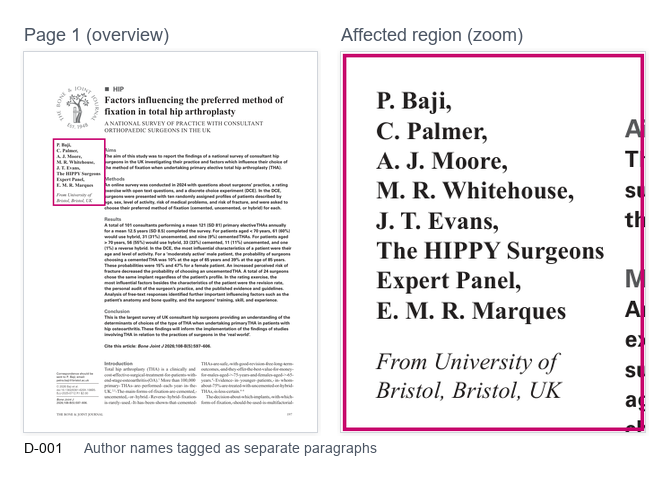
Author names are split into separate pieces.

Disrupts reading Page 1 · author paragraph fragmentation
What this is like to read with cognitive load

The reader must rebuild the author group.

The names should feel like one group. When they split apart, the reader must remember how they fit together.

Page 1 evidence · author block Same defect as D-001, different impact
Screenshot of page 1 showing the author names with a magenta rectangle around the affected author block.
For a screen reader user, the split adds pauses. For a cognitive reader, it adds memory load: the reader has to remember "all of these names belong together" while reading the rest of the page.
Before

M Boutros. G Awad. A Adio. R Sharma. S Patel.

After

Authors: M Boutros, G Awad, A Adio, R Sharma, and S Patel.

C-005

Column order makes the reading path hard to follow.

Disrupts reading Body pages · multi-column order
What this is like to read with cognitive load

The reader must guess where to go next.

Columns can look clear to a sighted reader. They become hard when the hidden order jumps across the page.

Expected order

1 · Left heading 2 · Left paragraph 3 · Right heading 4 · Right paragraph

Actual order in this PDF

1 · Left heading 2 · Right paragraph 3 · Left paragraph 4 · Right heading
Repair

Fix in Acrobat Pro

  1. Open the Order panel.
  2. Compare the order to the visible page.
  3. Move items into the correct sequence.
  4. Check the Tags panel too.
  5. Retest with keyboard and reading tools.
Reader cost

Why this hurts cognitive readers

The reader must solve layout while reading content. Two jobs at once is too many. The hidden order should match the visual path so the reader only has to do one job: understand the content.

C-006

There are no bookmarks for quick navigation.

Disrupts reading Whole PDF · bookmark structure
What this is like to read with cognitive load

The reader has no quick route back.

Without bookmarks, the reader must scroll or search. This adds memory load and makes recovery harder.

0bookmarks in PDF
Manypage jumps required
Highrecovery load
Before

No bookmark list. The reader must scroll and search to find a section.

After

Bookmarks: Abstract · Method · Results · Tables · Figures · References.

Repair

Fix in Acrobat Pro

  1. Open the Bookmarks panel.
  2. Add a bookmark for each main section.
  3. Use short, clear bookmark names.
  4. Match bookmarks to heading text.
  5. Test that each bookmark goes to the right page.
Reader cost

What recovery load means

Recovery load is the effort needed after losing your place. Readers with attention or memory load need strong return points. A bookmark panel acts as a stable map of the document.

03 Repair plan

What to fix first

COGA-friendly content feels calmer because it removes extra work. The reader should not have to decode structure, remember missing context, and learn content at the same time.

  1. Start with navigation. Add bookmarks that match the headings. This gives the reader a stable map.
  2. Rewrite dense text in the source file. Most sentences under 20 words. Most paragraphs under 80 words.
  3. Fix the reading order. The hidden order should follow the visible path.
  4. Group related content together. Authors, list items, table rows, and form labels should not split apart.
  5. Use sentence-case headings. Replace ALL CAPS with bold or a heading tag.
  6. Test with a real reader. Ask one person to find one section and explain the main point. Watch for pauses, rereading, and loss of place.
04 Overlap with the screen reader walkthrough

Same defects, different reasons they hurt

Two findings appear in both walkthroughs. The repair is the same. The reader experience is different.

Defect Screen reader impact (file 02) Cognitive impact (this file)
Author name fragmentation (D-001 / C-004) NVDA reads each name as a separate paragraph with a pause between names. Reader must remember the names belong to one group while reading the rest.
Reading / column order (D-003 / C-005) Answer announced before the question. Hidden order disagrees with visible page. Reader has to solve layout and learn content at the same time. Two jobs become one.